
When a packaging machine stops working, the first question is usually simple: why is my packaging machine not working, and how quickly can I get production running again?
For a small business, warehouse, or factory line, even a short stop can cause missed orders, delayed shipments, wasted materials, and frustrated operators. But not every machine problem means a major breakdown. Many issues come from setup errors, worn consumables, product variation, sensor misalignment, air pressure problems, film or label feeding issues, or skipped maintenance.
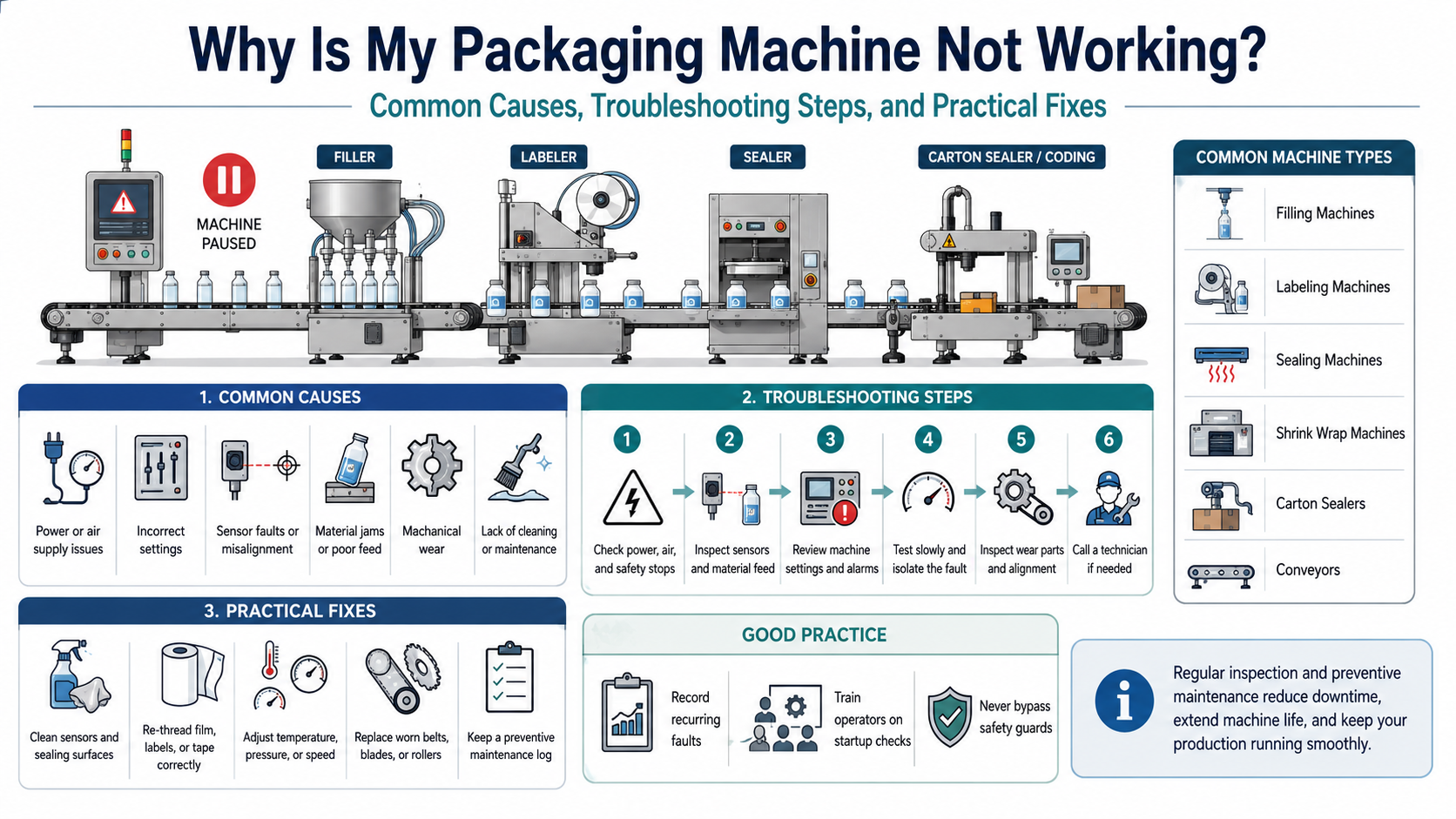
This guide explains the most common reasons packaging machines stop working, how to troubleshoot them safely, and when it is time to call a qualified technician. It is written for business owners, production supervisors, purchasing teams, and packaging beginners who need a clear, practical way to understand packaging equipment problems without getting lost in overly technical language.
Before doing any inspection or adjustment, safety comes first. Moving machine parts can cause serious injuries, and OSHA emphasizes that hazardous moving parts must be guarded when they can injure operators or nearby workers. During servicing or maintenance, lockout/tagout procedures are intended to protect workers from unexpected energization, startup, or release of stored energy.
Why Is My Packaging Machine Not Working? Start with the Basic Causes
Most packaging machine problems fall into a few broad categories:
- Power, air, or utility supply problems
- Incorrect machine setup
- Material feeding problems
- Sensor or control system faults
- Mechanical wear or misalignment
- Product variation
- Operator error
- Lack of cleaning or preventive maintenance
A common mistake is to assume the most expensive part has failed. In real production environments, the cause is often simpler: low air pressure, a dirty sensor, incorrect temperature setting, loose guide rail, worn belt, jammed label roll, poor-quality film, or a product that no longer matches the machine setup.
Packaging troubleshooting works best when you move from simple checks to more technical checks. PMMI has described effective troubleshooting as a logical process that helps technicians ask the right questions before making adjustments or repairs.
Quick Troubleshooting Checklist Before You Call a Technician
Use this first-pass checklist when a packaging machine will not start, stops randomly, or produces poor packages.
| Area to Check | What to Look For | Common Result |
|---|---|---|
| Power supply | Main switch, emergency stop, fuse, breaker, loose plug | Machine does not start |
| Air supply | Low pressure, leaking air line, closed valve | Weak sealing, poor filling, incomplete motion |
| Safety guards | Open guard door, triggered safety switch | Machine will not run |
| Sensors | Dirty, blocked, misaligned, loose cable | False alarms, missed products, random stops |
| Materials | Wrong film, labels, cartons, tape, bottles, caps | Jams, bad seals, misfeeds |
| Machine settings | Speed, temperature, timing, fill volume, label position | Inconsistent output |
| Product condition | Product size variation, wet surface, dusty container, unstable bottle | Labeling, filling, sealing errors |
| Wear parts | Belts, knives, sealing jaws, rollers, bearings, nozzles | Gradual performance decline |
| Cleaning | Dust, glue, film residue, product buildup | Poor accuracy or mechanical drag |
| Operator procedure | Wrong loading path, incorrect reset, skipped startup steps | Repeated simple faults |
If the machine recently worked well and suddenly stopped, look first for a change: new operator, new packaging material, new product size, new label roll, new film roll, changed compressed air supply, or a recent cleaning or adjustment.
Common Packaging Machine Problems and What They Usually Mean
1. The Machine Will Not Turn On
If the machine is completely dead, start with the electrical basics.
Possible causes include:
- Main power switch is off
- Emergency stop button is engaged
- Power cord or plug is loose
- Blown fuse or tripped breaker
- Control cabinet issue
- Safety guard switch not closed
- Faulty power supply or PLC input
For beginners, the emergency stop button is one of the easiest things to miss. Many packaging machines will not restart until the emergency stop is released and the machine is properly reset.
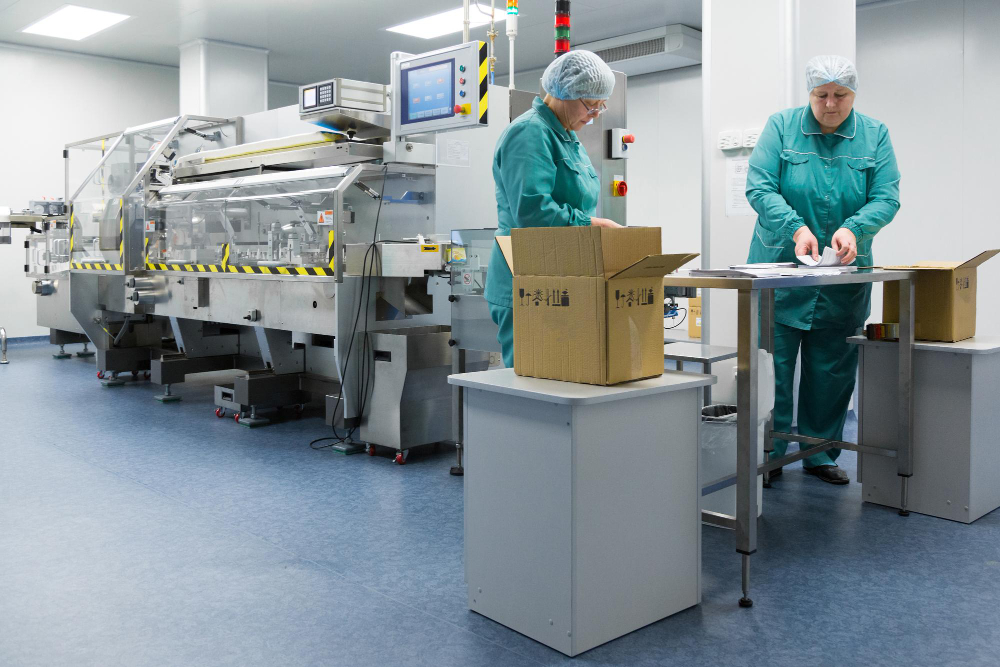
Do not bypass electrical protection devices or safety switches. Machine guarding and energy-control procedures exist because moving parts, heat, blades, pressure systems, and powered conveyors can create serious hazards.
2. The Machine Starts but Stops Randomly
Random stopping is one of the most frustrating packaging line problems because the machine may run well for several minutes and then stop without an obvious reason.
Common causes include:
- Sensor misalignment
- Product spacing problems
- Loose cables
- Low or unstable air pressure
- Overloaded conveyor
- Film, label, or tape feeding resistance
- Motor overload
- Poor machine timing
- Safety guard vibration
- Intermittent photoelectric sensor blockage
A practical example: a labeling machine may stop randomly because bottles are not entering at consistent spacing. The labeler sees one bottle correctly, then misses the next one because the product position changes. The operator may think the labeler is defective, when the real issue is conveyor spacing or guide rail adjustment.
3. The Machine Runs but Packages Look Bad
Sometimes the machine is technically “working,” but the results are unacceptable. This can include crooked labels, weak seals, leaking containers, wrinkled shrink film, poor print quality, crushed cartons, or inconsistent fill levels.
This type of problem often points to one of four things:
- Incorrect setup
- Poor material compatibility
- Worn contact parts
- Product variation
For example, sealing problems may come from low temperature, too much speed, uneven pressure, dirty sealing jaws, worn Teflon tape, or packaging film that does not match the machine. Maintenance guides for packaging machines commonly emphasize checking sealing surfaces, pressure rollers, residue buildup, lubrication points, and wear components as part of routine care.
Troubleshooting by Machine Type
Different packaging machines fail in different ways. The table below gives a quick overview.
| Machine Type | Common Problem | Likely Causes | First Checks |
|---|---|---|---|
| Filling machine | Inconsistent fill volume | Air pressure, worn seals, product viscosity, nozzle blockage | Check product flow, nozzles, air pressure, calibration |
| Labeling machine | Crooked or missing labels | Sensor issue, label roll tension, bottle spacing, surface condition | Clean sensors, adjust guides, check label path |
| Sealing machine | Weak or open seals | Temperature, dwell time, pressure, dirty sealing jaws | Check heat, pressure, film compatibility |
| Shrink wrap machine | Wrinkled or burned film | Heat setting, film type, tunnel speed, airflow | Adjust temperature, speed, perforation, film tension |
| Carton sealer | Tape not sticking or misaligned | Tape quality, roller pressure, flap folding, carton size | Check tape head, guides, carton dimensions |
| Coding machine | Faint or missing print | Ink, ribbon, printhead, sensor trigger, substrate | Check consumables, printhead, product detection |
| Conveyor | Jerky movement or jams | Belt tracking, motor, rollers, debris, product spacing | Inspect belt, rollers, guides, motor load |
Filling Machine Not Working: Common Causes
Filling machines can be affected by both machine settings and product characteristics. A machine that fills water accurately may not fill honey, sauce, shampoo, oil, or powder the same way.
Common filling machine issues include:
- Underfilling or overfilling
- Dripping nozzles
- Foaming during filling
- Product splashing
- Air bubbles
- Nozzle blockage
- Inconsistent container positioning
- Pump or valve wear
Possible causes:
- Product viscosity changed
- Product temperature changed
- Fill speed is too high
- Nozzle size is wrong
- Piston, pump, or valve seals are worn
- Air pressure is unstable
- Container height or opening size varies
- Product contains particles or pulp
A simple real-world example: a small food producer may use the same piston filler for two sauces. One sauce is smooth; the other contains small seeds or fibers. The second product may clog the valve or nozzle unless the filling path is designed for particulates.
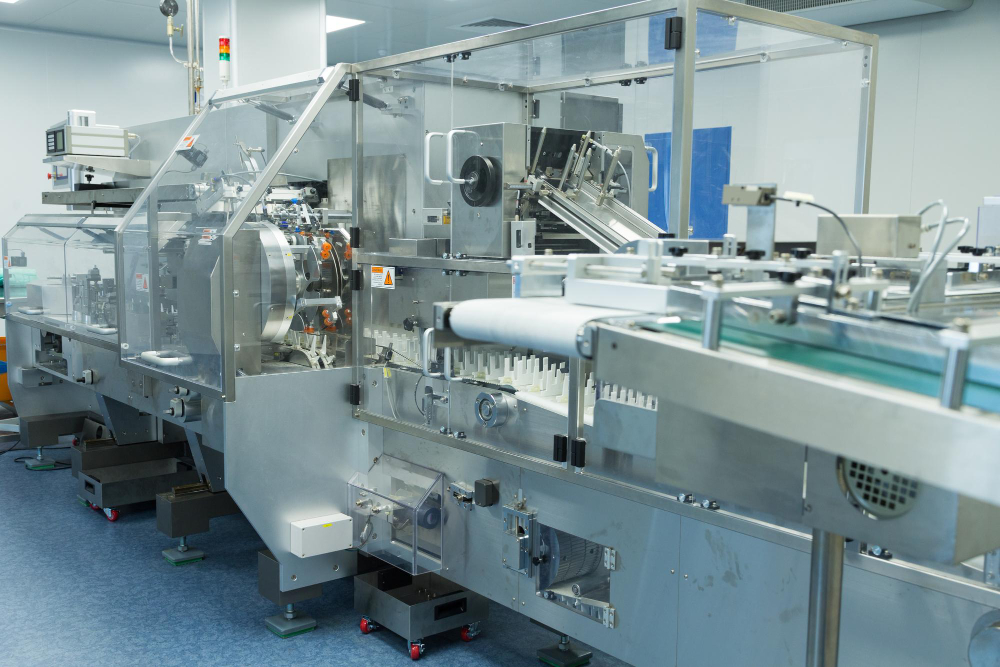
When to choose a different filling setup
Consider a different filling system if the current machine repeatedly struggles with:
- Very thick products
- Foaming liquids
- Products with particles
- Hot-fill applications
- Corrosive chemicals
- Very small fill volumes
- High-speed production needs
The machine may not be “broken.” It may simply be poorly matched to the product.
Labeling Machine Not Working: Common Causes
Labeling machines are sensitive to product shape, surface condition, label quality, and sensor setup.
Common symptoms include:
- Label is crooked
- Label wrinkles
- Label does not dispense
- Label is applied too early or too late
- Label backing web breaks
- Machine misses some bottles
- Labels are inconsistent from one product to the next
Likely causes include:
- Label sensor is dirty or misadjusted
- Product sensor is not detecting correctly
- Label roll is loaded incorrectly
- Label tension is too high or too low
- Product guide rails are loose
- Bottles are wet, oily, dusty, or unstable
- Label adhesive is not suitable for the container surface
Routine maintenance and prompt troubleshooting help reduce downtime and extend labeler performance, especially because labeling machines wear over time with continuous use.
A practical check: run the labeler slowly and watch three things — product position, label peel point, and wipe-down contact. Many label problems become obvious at low speed.
Sealing Machine Not Working: Common Causes
Sealing problems are common because sealing depends on a balance of heat, pressure, time, and material.
Common symptoms include:
- Seal opens easily
- Seal is burned
- Seal is wrinkled
- Seal is uneven
- Bag or pouch leaks
- Film sticks to sealing jaw
- Machine cuts poorly
Likely causes include:
- Temperature too low or too high
- Dwell time too short
- Machine speed too fast
- Uneven sealing pressure
- Dirty sealing jaw
- Worn sealing strip
- Wrong film or pouch material
- Product contamination in the seal area
For heat sealing, a “more heat” approach is not always the solution. Too much heat can deform film, burn material, or cause sticking. A better method is to adjust temperature, pressure, and dwell time together.
Shrink Wrap Machine Not Working: Common Causes
Shrink wrap systems usually include a sealer and a heat tunnel. Problems may come from film type, seal quality, tunnel temperature, airflow, or conveyor speed.
Common symptoms include:
- Film does not shrink tightly
- Film burns or tears
- Wrinkles remain after shrinking
- Ballooning occurs
- Seals split in the tunnel
- Product shifts inside the film
Likely causes include:
- Tunnel temperature too low or too high
- Conveyor speed too fast or too slow
- Poor airflow balance
- Wrong film gauge
- Weak seal before tunnel entry
- Film tension issue
- Product shape creates difficult shrink zones
A frequent beginner mistake is adjusting only tunnel heat. In many cases, the real problem is a weak seal or incorrect film tension before the package enters the tunnel.
Carton Sealer Not Working: Common Causes
Carton sealers are usually reliable, but they depend on consistent box size, tape quality, and correct adjustment.
Common symptoms include:
- Tape does not stick
- Tape is off-center
- Tape wrinkles
- Tape tail is too short
- Carton jams
- Box flaps do not close properly
- Tape head cuts poorly
Likely causes include:
- Wrong tape for carton surface
- Dusty or recycled corrugated boxes
- Tape roll installed incorrectly
- Worn blade
- Incorrect tape head tension
- Side belts not gripping evenly
- Carton size variation
- Box is overfilled or bulging
If cartons are inconsistent, the sealer may look like the problem when the actual cause is poor box forming or overpacking upstream.
Coding and Marking System Not Working: Common Causes
Coding systems include inkjet printers, thermal transfer printers, laser coders, and other date or batch marking equipment.
Common symptoms include:
- No print
- Faint print
- Blurry print
- Missing characters
- Wrong date or batch code
- Print in the wrong location
- Ink not adhering
- Ribbon breaking
Likely causes include:
- Empty or expired consumables
- Dirty printhead
- Wrong ink or ribbon for the material
- Product sensor not triggering
- Encoder issue
- Incorrect print delay
- Product moving too fast
- Dust, moisture, or oil on the surface
For coding systems, always check consumables and product detection before assuming a printer failure.
Conveyor or Packaging Line Not Working: Common Causes
A packaging line is only as stable as its product flow. Even if the main machine is fine, conveyor problems can create machine faults downstream.
Common symptoms include:
- Products bunch up
- Products fall over
- Machine misses products
- Random jams
- Belt slips
- Conveyor runs unevenly
- Products enter the machine at the wrong angle
Likely causes include:
- Belt tracking problem
- Guide rails too tight or too loose
- Product spacing issue
- Roller wear
- Debris under belt
- Motor overload
- Speed mismatch between machines
- Poor transfer between conveyors
Many packaging issues are not caused by the machine itself, but by the way products arrive at the machine.
A Simple Step-by-Step Troubleshooting Process
Step 1: Stop and make the area safe
Do not reach into a running machine. Do not bypass guards. Do not clear jams while the machine is energized unless the manufacturer’s safe operating procedure specifically allows it.
For maintenance or servicing, follow proper lockout/tagout procedures. OSHA explains that lockout/tagout is intended to protect workers from unexpected startup or stored energy release during servicing and maintenance.
Step 2: Identify the exact symptom
Avoid vague descriptions like “the machine is broken.” Write down what is actually happening:
- Does it fail to start?
- Does it stop after a few cycles?
- Is the package defective?
- Is the machine producing an alarm?
- Is the problem constant or intermittent?
- Did it start after a material change?
Step 3: Check the last thing that changed
Packaging machines often fail after a change in:
- Operator
- Product size
- Film roll
- Label roll
- Carton supplier
- Tape type
- Fill product
- Speed setting
- Cleaning procedure
- Compressed air pressure
- Electrical supply
- Upstream conveyor setup
Step 4: Run the machine slowly
If safe and appropriate, run the machine at a reduced speed and watch the process. Many faults become easier to see at low speed.
Step 5: Isolate the section
For a packaging line, separate the problem by section:
- Product infeed
- Filling
- Capping
- Labeling
- Coding
- Sealing
- Cartoning
- Conveying
- Case sealing
- Palletizing
This prevents the team from adjusting the wrong machine.
Step 6: Make one adjustment at a time
Changing temperature, speed, pressure, guides, sensors, and material tension all at once makes troubleshooting harder. Adjust one variable, test, and record the result.
Common Mistakes to Avoid
Mistake 1: Blaming the machine before checking the material
Bad film, labels, cartons, tape, or bottles can make a good machine perform badly. Always compare the current material with a previous batch that worked.
Mistake 2: Running too fast too soon
Many packaging machines can run at high speeds, but only when the product, material, operator skill, and upstream flow are stable.
Mistake 3: Ignoring compressed air quality
Low pressure, water in air lines, or unstable air supply can cause weak motion, poor filling, missed cycles, and inconsistent sealing.
Mistake 4: Over-adjusting sensors
A dirty or slightly misaligned sensor may need cleaning and careful positioning, not constant sensitivity changes.
Mistake 5: Skipping the manual
The machine manual usually contains fault codes, setup ranges, lubrication points, recommended wear parts, and wiring information. It should be part of daily troubleshooting, not a document stored away after installation.
Mistake 6: Not recording faults
If operators do not record alarms, material batches, speed settings, and corrective actions, the same issue will return again and again.
Mistake 7: Bypassing safety devices
Bypassing guards, switches, or emergency stops can create serious injury risks. Machine guarding is a core safety requirement where machine parts, functions, or processes may injure operators.
Maintenance and Operating Tips to Reduce Downtime
Preventive maintenance is one of the most reliable ways to reduce packaging machine problems. Predictive maintenance, where sensors or operating data help identify problems before failure, is also increasingly important in packaging operations; PMMI has highlighted machine health metrics, servo-axis failure patterns, and smart sensor deployment as relevant areas in packaging predictive maintenance.
Daily checks
- Clean dust, glue, film scraps, and product residue
- Check emergency stop and guards
- Inspect air pressure
- Confirm material path
- Check sensors for dust or blockage
- Look for loose fasteners
- Listen for unusual noise
- Record faults and adjustments
Weekly checks
- Inspect belts, rollers, bearings, chains, and guides
- Check lubrication points
- Inspect sealing jaws, blades, tape heads, printheads, and nozzles
- Verify machine leveling and alignment
- Check electrical cabinet filters if applicable
- Review operator notes
Monthly checks
- Inspect wear parts
- Check calibration
- Review downtime patterns
- Inspect pneumatic fittings and hoses
- Check motor and gearbox condition
- Review spare parts inventory
- Confirm operators are following standard setup procedures
Maintenance logs are useful because they create a history of cleaning, lubrication, part replacement, and troubleshooting actions. Some maintenance guides recommend keeping daily records so teams can track machine condition and identify recurring issues.
When to Choose Repair, Adjustment, or Replacement
Not every machine problem requires replacement. Use this simple decision guide.
| Situation | Best Option | Why |
|---|---|---|
| Machine worked well before, but suddenly stopped | Troubleshoot and repair | Likely a part, setting, sensor, or utility issue |
| Problem started after changing packaging material | Adjust setup or change material | Machine may not match the new material |
| Machine works only at very low speed | Inspect wear parts and product flow | Mechanical wear or infeed instability may limit speed |
| Machine often fails on one product type | Review machine suitability | Product may not match the equipment design |
| Repairs are frequent and downtime is expensive | Consider upgrade or replacement | Old equipment may cost more to maintain than replace |
| Safety guards or controls are damaged | Stop and repair before use | Safety systems should not be bypassed |
| Machine lacks parts support | Plan replacement | Unsupported machines increase downtime risk |
When to choose adjustment
Choose adjustment when the problem is linked to setup, product size, label position, conveyor guides, temperature, speed, pressure, timing, or sensor position.
When to choose repair
Choose repair when a specific part is worn, damaged, leaking, loose, or electrically faulty.
When to choose replacement
Choose replacement when the machine is no longer suitable for your production volume, product range, packaging material, safety expectations, or spare parts availability.
Real-World Examples
Example 1: The labeler keeps applying crooked labels
The team assumes the labeler is defective. After checking, the real issue is unstable bottle spacing from the conveyor. The labeler receives products at inconsistent positions, so label placement changes. The fix is guide rail adjustment and better product spacing before the labeler.
Example 2: The sealer makes weak seals after changing film
The machine worked well with the previous roll. A new film supplier is used, and seals begin opening. The machine may need different heat, pressure, or dwell time. The better fix may be material testing, not replacing the sealer.
Example 3: The filling machine underfills thick sauce
The filler was originally set up for a thinner liquid. With thicker sauce, the product flows more slowly and may trap air. The team may need slower fill speed, larger nozzle, different pump type, or product temperature control.
Example 4: The carton sealer jams every few boxes
The sealer is blamed, but the cartons are overfilled and bulging. The side belts cannot grip consistently, and the flaps do not close cleanly. The actual fix is upstream packing control and carton size review.
How to Build a Better Troubleshooting Culture
A good packaging operation does not rely only on one experienced technician. It builds simple systems that help operators catch problems early.
Useful practices include:
- Create startup checklists
- Keep machine manuals near the line
- Train operators on normal sounds and motion
- Record fault codes and material batches
- Keep common spare parts available
- Standardize changeover settings
- Use photos for correct material threading
- Review downtime weekly
- Clean machines before problems build up
- Avoid unauthorized adjustments
Operators often notice small changes before a major failure. Training operators to listen to the machine, recognize early signs of trouble, and service heavily used parts regularly can help prevent larger breakdowns.
Final Thoughts
If you are asking, “why is my packaging machine not working?”, the best answer is to troubleshoot in a structured way. Start with safety, then check utilities, materials, sensors, setup, product flow, and wear parts before assuming a major failure.
Many packaging machine problems are not caused by one dramatic breakdown. They are often the result of small issues: a dirty sensor, low air pressure, worn belt, wrong film, poor label tension, unstable product spacing, or skipped cleaning.
For small businesses and production teams, the goal is not only to fix today’s fault. The better goal is to understand why it happened, record the cause, train operators, and prevent the same downtime from returning next week.
7. FAQ
Why is my packaging machine not working even though it has power?
If the machine has power but will not run, check the emergency stop, safety guards, door switches, air pressure, fault alarms, and reset procedure. Many machines will not operate if a guard is open, a sensor is blocked, or compressed air is below the required level.
Why does my packaging machine stop randomly?
Random stops are often caused by sensor problems, inconsistent product spacing, loose cables, low air pressure, safety switch vibration, material feed resistance, or motor overload. Run the machine slowly and observe where the stop occurs.
Why is my sealing machine not making strong seals?
Weak seals may come from low temperature, short dwell time, insufficient pressure, dirty sealing jaws, worn sealing strips, contaminated seal areas, or incompatible packaging film. Do not only increase heat; check pressure, time, cleanliness, and material quality too.
Why is my filling machine giving inconsistent fill volumes?
Inconsistent filling can be caused by unstable product flow, worn seals, blocked nozzles, changing viscosity, air bubbles, low air pressure, or poor container positioning. Product temperature and thickness can also affect fill accuracy.
Why is my labeling machine applying labels crooked?
Crooked labels usually come from poor product positioning, loose guide rails, incorrect label tension, sensor misalignment, unstable containers, or poor wipe-down contact. Check the product path before adjusting the labeler repeatedly.
Why does my shrink wrap machine burn or wrinkle film?
Burning usually means too much heat, slow tunnel speed, poor airflow, or unsuitable film. Wrinkles may come from low heat, fast conveyor speed, poor film tension, weak seals, or incorrect film size.
How often should I maintain a packaging machine?
Basic cleaning and inspection should usually happen daily. Wear parts, lubrication points, belts, rollers, sensors, nozzles, sealing parts, and tape heads should be checked on a planned schedule based on production volume and the manufacturer’s manual.
Should I repair or replace my packaging machine?
Repair the machine if the issue is isolated, parts are available, and the machine still fits your production needs. Consider replacement if downtime is frequent, parts are hard to find, safety systems are outdated, or the machine no longer matches your product or volume.
What should operators record when a packaging machine fails?
Operators should record the time, product, packaging material batch, machine speed, alarm message, symptom, recent changeover settings, and the action taken. This helps identify patterns and prevent repeated downtime.
Is it safe to clear a jam while the machine is powered?
Do not reach into a powered machine unless the manufacturer’s safe operating procedure specifically allows it. For maintenance, servicing, or jam clearing that exposes workers to hazardous energy, proper lockout/tagout procedures should be followed.