

When a shrink wrap machine film is not shrinking evenly, the finished package usually tells you right away. One side looks tight, another side stays loose. Corners may form dog ears. The surface may show wrinkles, fish eyes, cloudy patches, or small holes. The product is still wrapped, but it does not look clean, professional, or consistent.
This problem is more than a cosmetic issue. Uneven shrinkage can affect product protection, shelf appearance, seal strength, and even production efficiency. If your packaging line has to stop repeatedly for rework, film waste, or machine adjustment, the cost adds up quickly.
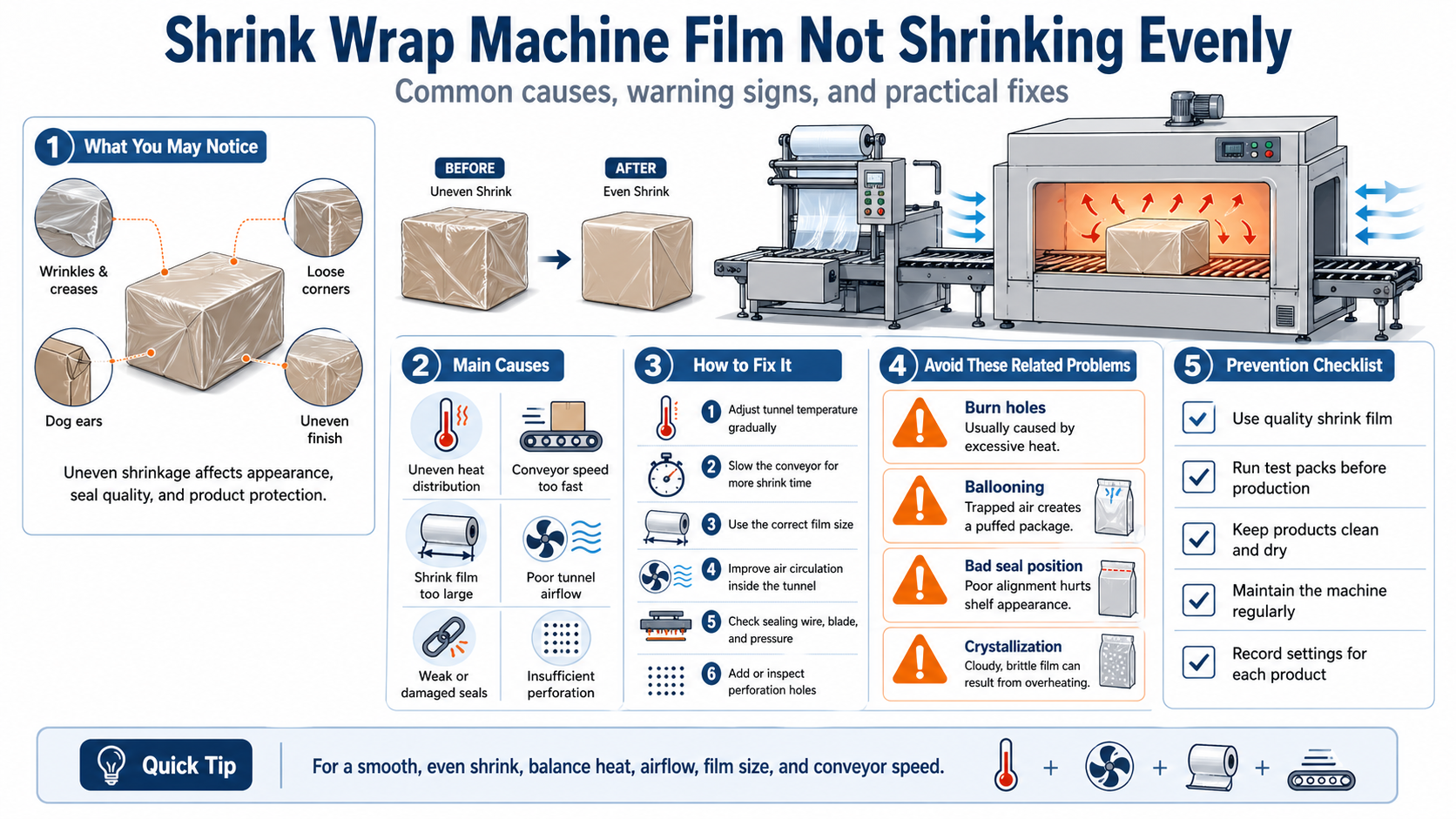
The good news is that uneven shrinking usually comes from a few predictable areas: heat distribution, conveyor speed, film size, air circulation, perforation, sealing quality, or machine maintenance. Once you know where to look, the problem becomes much easier to fix.
Why Shrink Wrap Machine Film Is Not Shrinking Evenly
Shrink film needs the right combination of heat, airflow, time, tension, and film size. If one of these factors is off, the film may shrink more in one area than another.
In most cases, uneven shrinkage is caused by one or more of the following:
- The shrink tunnel temperature is too low, too high, or inconsistent.
- The conveyor is moving too fast.
- The film is too large for the product.
- Air circulation inside the tunnel is uneven.
- The film has too few perforation holes.
- The product is not centered correctly.
- The seal is weak, damaged, or positioned badly.
- The wrong type or thickness of shrink film is being used.
- The machine has worn sealing wires, dirty blades, or misaligned parts.
Instead of changing everything at once, it is better to troubleshoot step by step. Start with heat, speed, and film size, because these are the most common causes.
1. Check the Shrink Tunnel Temperature
Heat is the first thing to inspect when the film does not shrink evenly. If the temperature is too low, the film may stay loose or form wrinkles. If the temperature is too high, the film can burn, crystallize, or develop holes.
Uneven heat is even more troublesome. One side of the package may shrink tightly while the other side remains loose. This often happens when the heat tunnel has poor airflow, damaged heating elements, blocked vents, or incorrect temperature settings.
How to fix it
Start by checking the recommended temperature range for your shrink film. PVC, polyolefin, and polyethylene films do not all respond the same way to heat. A setting that works for one film may be too hot or too weak for another.
Then run a few test packages. If the film looks loose or wrinkled, increase the tunnel temperature slightly. If the film shows burn holes, cloudy areas, or brittle patches, reduce the temperature.
Do not make large adjustments at once. Small changes are easier to track and help you find the correct setting without wasting too much film.
2. Adjust the Conveyor Speed
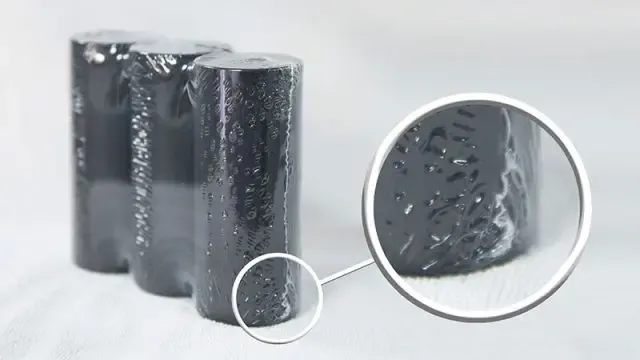
Conveyor speed controls how long the product stays inside the heat tunnel. If the conveyor moves too fast, the film may not have enough time to shrink fully. This can cause wrinkles, fish eyes, loose areas, and uneven shrinkage.
If the conveyor moves too slowly, the film may be exposed to too much heat. That can lead to holes, crystallization, or a brittle finish.
How to fix it
If the film is not shrinking enough, slow down the conveyor slightly. This gives the film more time to react to heat and tighten around the product.
If you see holes, haze, or over-shrinking, increase the conveyor speed or lower the tunnel temperature. The goal is to balance heat and exposure time.
A useful approach is to record the best settings for each product size and film type. This prevents operators from guessing every time the production line changes.
3. Make Sure the Film Size Is Correct
Film size is one of the most common reasons for uneven shrinkage. If the film is too wide or too long, there will be too much excess material around the product. That extra film has nowhere to go, so it forms wrinkles, bunching, dog ears, or loose corners.
If the film is too small, it may stretch too tightly, tear, pull at the seal, or fail to cover the product properly.
How to fix it
Choose a film width that fits the product with only enough extra material for sealing and shrinking. The film should not be baggy before it enters the tunnel.
Pay close attention to products with sharp corners, irregular shapes, or uneven surfaces. These items may require a different film size, better product positioning, or additional guides.
If dog ears appear at the corners, the film is often too large or the heat is not strong enough to pull the excess film tight.
4. Improve Air Circulation Inside the Shrink Tunnel
Shrink film does not only need heat. It needs evenly distributed hot air. If airflow is weak or unbalanced, one side of the package may shrink better than the other.
Poor air circulation can cause several visible problems, including uneven shrinkage, dog ears, wrinkles, fish eyes, and bad seal position. In some cases, the top of the package receives too much airflow while the sides or bottom do not receive enough.
How to fix it
Check the tunnel fan speed and airflow settings. If the film is loose or wrinkled, increasing the air circulation may help the film shrink more evenly.
Also inspect the tunnel for dust, film residue, blocked vents, or damaged parts. Even a small obstruction can affect airflow inside the tunnel.
If your machine allows separate top, bottom, and side airflow adjustment, make sure the air is balanced around the whole package.
5. Check the Perforation Holes
Perforation holes allow trapped air to escape while the film shrinks. Without proper air release, the package may balloon, wrinkle, or shrink unevenly.
Ballooning happens when air gets trapped inside the film before it can escape. The package may look inflated rather than tight. Poor perforation can also contribute to holes, tears, fish eyes, and uneven surfaces.
How to fix it
Inspect the perforators on your machine. Make sure they are actually creating clean, consistent holes in the film.
If air is trapped inside the package, increase the number of perforation points or use pre-perforated shrink film. The holes should be small and neat, not large tears.
Also check whether the conveyor is too fast. Sometimes the air simply does not have enough time to escape before the film tightens.
6. Inspect the Seal Quality
A good shrink result starts with a good seal. If the seal has small tears, punctures, weak areas, or uneven pressure, the film may not shrink properly around the product.
A proper seal helps create a light balloon effect before shrinking. This temporary shape allows the film to tighten smoothly as it moves through the heat tunnel. If the seal is damaged, the film may collapse unevenly and create wrinkles or fish eyes.
How to fix it
Check the sealing blade, wire, and sealing pad. Look for plastic residue, worn Teflon coating, uneven contact, or damaged wires.
Clean the sealing area regularly with suitable tools. Do not let melted film build up on the blade or wire, because residue can cause weak seals and rough cuts.
If the seal opens too easily or has small punctures, adjust the sealing temperature, pressure, or dwell time. For thicker film, you may need more heat or longer sealing time.
7. Watch for Dog Ears and Wrinkles
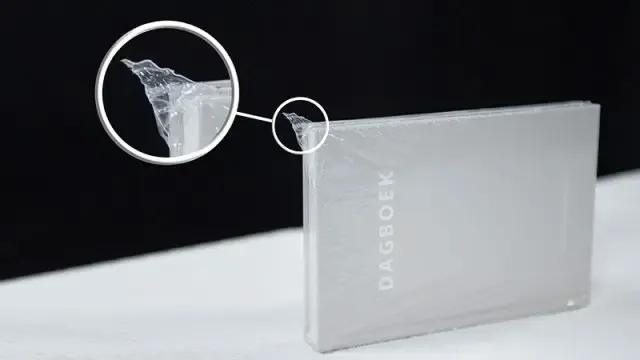
Dog ears are triangular flaps of excess film at the corners of the package. Wrinkles, sometimes called crow’s feet, usually appear near corners or edges.
Both problems often point to the same underlying issues: too much film, insufficient heat, poor airflow, or conveyor speed that is too fast.
How to fix it
If you see dog ears or corner wrinkles, try these adjustments:
Reduce the film size if there is too much excess material.
Increase the tunnel temperature slightly if the film is not shrinking enough.
Increase fan speed if hot air is not reaching the corners.
Slow down the conveyor so the film has more time to tighten.
Also make sure the product is centered correctly before sealing. Poor positioning can leave one side with too much film and the other side too little.
8. Avoid Burn Holes and Crystallization
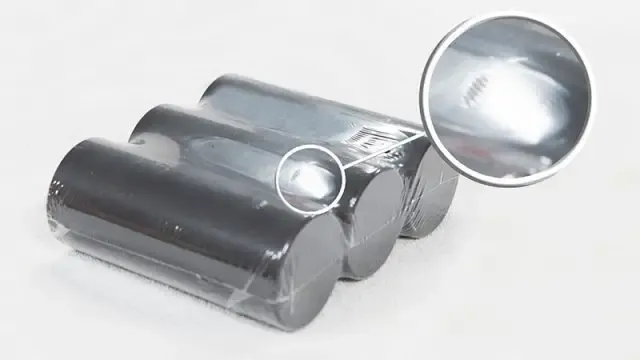
Sometimes operators increase the heat to fix uneven shrinkage, but too much heat creates a new problem. Burn holes appear when the film melts or tears from excessive heat. Crystallization appears as hazy, brittle areas that break easily.
These issues usually mean the film is getting too much heat, too much air velocity, or staying in the tunnel too long.
How to fix it
Reduce the tunnel temperature if the film shows holes or cloudy brittle spots.
Lower the air velocity if the hot air is too aggressive.
Adjust the conveyor speed so the product does not stay in the tunnel too long.
Check perforation as well. If air cannot escape properly, pressure can build inside the package and cause weak points or tears.
9. Choose the Right Shrink Film Type
Not all shrink films behave the same way. PVC, polyolefin, and polyethylene films have different shrink properties, thicknesses, clarity, strength, and heat requirements.
If the film is too thin, it may tear or fail to hold tension. If it is too thick, it may need more heat and more time to shrink evenly. Low-quality film may also shrink inconsistently, even when the machine settings are correct.
How to fix it
Match the film to the product’s size, weight, shape, and display requirements.
For food or consumer goods, polyolefin is often preferred because it is flexible, clear, and suitable for many retail applications. For heavier products, polyethylene may offer better durability. PVC can create a crisp finish but may not be ideal for every product or environment.
Also check film storage. Shrink film can degrade if exposed to heat, sunlight, humidity, or poor storage conditions. Old or damaged film may not shrink predictably.
10. Keep the Machine Clean and Calibrated
A shrink wrap machine needs regular maintenance to produce consistent results. Dirty sealing blades, worn wires, damaged belts, blocked airflow, and misaligned conveyors can all cause uneven shrinking.
Even if the control panel shows the right temperature, the actual heat inside the tunnel may not be even. Heating elements and sensors can drift over time.
How to fix it
Create a simple maintenance routine:
Clean sealing wires, blades, and bars after high-volume runs.
Inspect tunnel fans, vents, and heating elements.
Check conveyor alignment and belt condition.
Replace worn sealing wires and damaged Teflon coating.
Use a thermometer or infrared temperature tool to verify actual heat levels.
Keep a machine log so recurring problems are easier to identify.
Regular maintenance is not just about preventing breakdowns. It helps keep the shrink result predictable from one shift to the next.
11. Standardize Settings for Different Products
If your line packages different product sizes, one setting will not work for everything. A small box, an irregular item, and a heavy product may all need different film sizes, temperatures, conveyor speeds, and perforation patterns.
When operators rely on memory or guesswork, uneven shrinkage becomes more likely.
How to fix it
Create a setup sheet for each product or product category. Include:
Film type and thickness.
Film width.
Tunnel temperature.
Conveyor speed.
Fan speed.
Sealing temperature.
Perforation requirements.
Common defects and quick fixes.
This makes the process easier for new operators and helps maintain consistent packaging quality across different shifts.
Quick Troubleshooting Guide
If the film is loose or wrinkled, increase tunnel temperature slightly, slow the conveyor, or check whether the film is too large.
If one side shrinks more than the other, inspect tunnel airflow, heating elements, and product positioning.
If dog ears appear, reduce excess film, increase airflow, or raise the temperature slightly.
If holes appear, lower the temperature, reduce air velocity, or check perforation.
If the seal breaks, clean or replace the sealing wire, check sealing pressure, and inspect the sealing pad.
If the film balloons, increase perforation and slow down the conveyor.
If the package looks cloudy or brittle, reduce heat exposure and check whether the film is being overheated.
Final Thoughts
When shrink wrap machine film is not shrinking evenly, the best solution is not random adjustment. The best solution is controlled troubleshooting.
Start with the basics: film size, tunnel temperature, conveyor speed, airflow, and perforation. Then inspect sealing quality, product alignment, material compatibility, and machine maintenance.
A clean, even shrink package comes from balance. The film needs the right amount of heat, enough time in the tunnel, proper air escape, and a good seal before shrinking. Once those elements work together, your packaging will look tighter, cleaner, and more professional with less waste and fewer interruptions.
FAQ
Why is my shrink wrap machine film not shrinking evenly?
The most common causes are uneven heat distribution, incorrect tunnel temperature, conveyor speed that is too fast, oversized film, poor airflow, weak seals, or insufficient perforation holes.
How do I fix uneven shrink film?
Start by adjusting the tunnel temperature and conveyor speed. Then check film size, airflow, perforation, seal quality, and machine cleanliness. Make small changes one at a time so you can identify the real cause.
Why does shrink film wrinkle after heating?
Wrinkles usually happen when there is too much film, not enough heat, poor airflow, weak sealing, or the product moves through the tunnel too quickly.
What causes dog ears in shrink wrapping?
Dog ears are usually caused by excess film at the corners, low tunnel heat, weak air circulation, incorrect film size, or poor product positioning.
Can too much heat cause uneven shrinkage?
Yes. Too much heat can cause burn holes, brittle film, crystallization, or over-shrinking in certain areas. Uneven heat can make one side shrink tightly while another side stays loose.
Should I slow down the conveyor speed?
If the film is loose, wrinkled, or not fully shrinking, slowing the conveyor can help. It gives the film more time inside the heat tunnel. However, if the film burns or becomes brittle, the conveyor may be too slow or the temperature may be too high.
Why are holes appearing in my shrink film?
Holes often come from excessive heat, poor airflow, sharp product edges, or insufficient perforation. Lower the tunnel temperature, reduce air velocity, and check whether trapped air is escaping properly.
How often should a shrink wrap machine be maintained?
Basic cleaning and inspection should be done regularly, especially after high-volume production. Sealing wires, blades, belts, fans, heating elements, and perforators should be checked on a routine schedule to prevent inconsistent results.