Choosing between an inkjet vs laser coding machine is one of those decisions that looks simple at first, but quickly becomes more complicated once you start thinking about real production conditions.
Both technologies can print dates, batch numbers, barcodes, QR codes, logos, and traceability information. Both are widely used in food packaging, beverage bottling, cosmetics, pharmaceuticals, chemicals, pet food, wire and cable, metal parts, and many other industries. On the surface, they seem to do the same job.
But in practice, they work in very different ways.
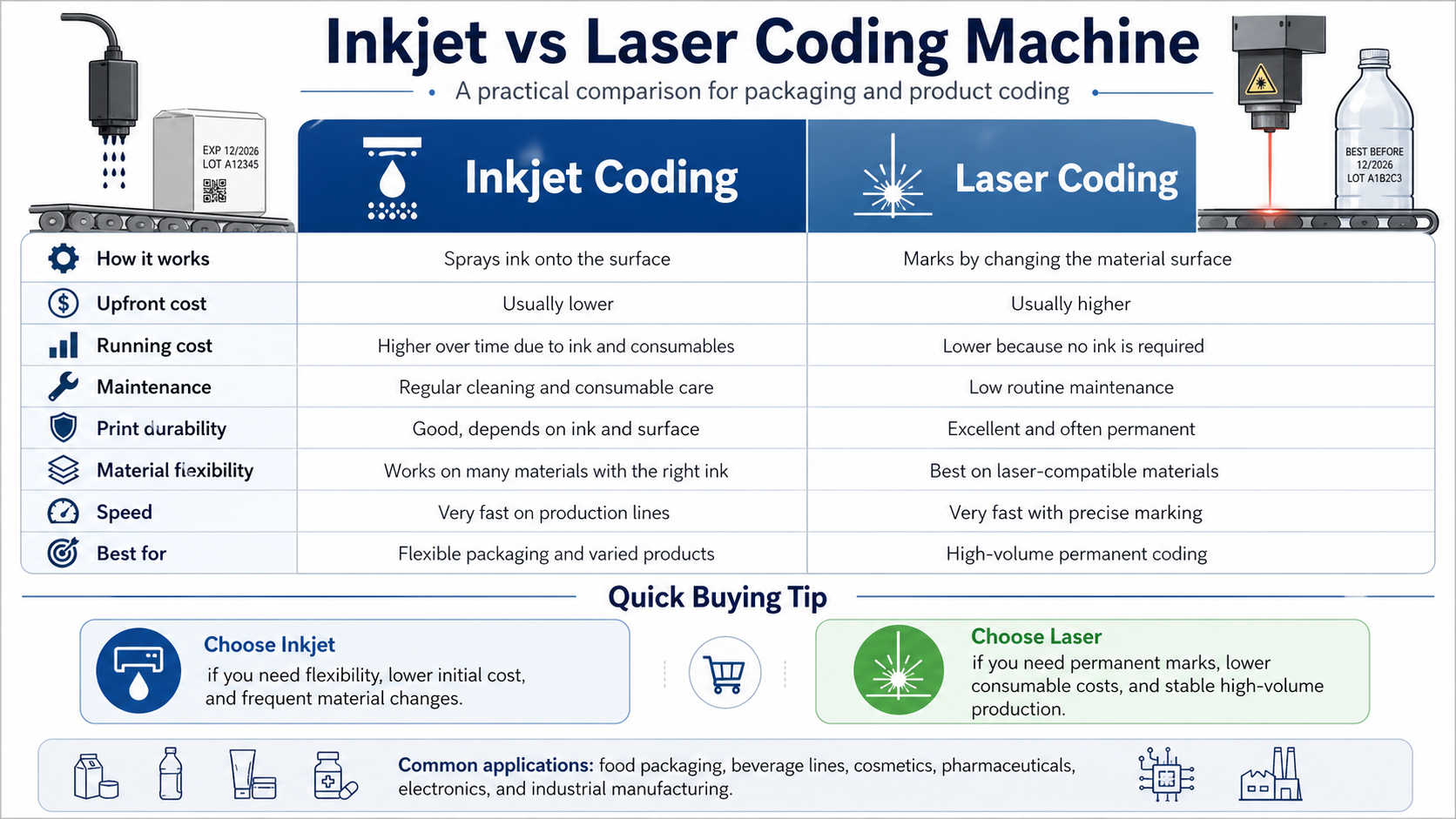
An inkjet coding machine sprays ink onto the product or package without touching the surface. A laser coding machine uses a focused beam of light to mark, engrave, burn, or change the surface of the material itself. That difference affects almost everything: purchase cost, running cost, maintenance, print quality, material compatibility, safety requirements, and long-term return on investment.
So, which one is better?
The honest answer is: it depends on your product, your packaging material, your line speed, and how much flexibility you need. This guide breaks down the key differences in a practical way, so you can make a better decision before investing in coding and marking equipment.
What Is an Inkjet Coding Machine?
An inkjet coding machine is an industrial printer designed to apply information onto products, packaging, cartons, bottles, labels, films, and other surfaces. Instead of touching the product, the printhead ejects tiny droplets of ink onto the surface.
Common inkjet coding technologies include:
- Continuous inkjet printers, often called CIJ printers
- Thermal inkjet printers, often called TIJ printers
- High-resolution piezo inkjet printers
- Large-character inkjet printers for cartons and outer packaging
The main strength of inkjet coding is flexibility. Different inks can be used for different surfaces, including porous materials such as paper and cardboard, as well as non-porous materials such as plastic, glass, metal, glossy cartons, and flexible films.
For many production lines, inkjet is the more adaptable option. If your products change often, your packaging materials vary, or you need to print different kinds of messages, inkjet usually gives you more room to adjust.
What Is a Laser Coding Machine?
A laser coding machine uses a concentrated beam of light to create a mark on the surface of a product or package. Instead of adding ink, the laser changes the material itself. Depending on the material and laser settings, the machine may create a mark by engraving, ablation, foaming, carbonization, or color change.
The most common industrial laser coding systems include:
- CO2 laser coding machines
- Fiber laser marking machines
- UV laser marking machines
Each laser type is suited to different materials. CO2 lasers are often used for paper, cardboard, glass, wood, labels, and certain plastics. Fiber lasers are commonly used for metals, hard plastics, and industrial parts. UV lasers are useful for more delicate materials where low heat impact is important.
The biggest advantage of laser coding is that it does not require ink, solvent, ribbons, or other printing consumables. Once installed correctly, a laser system can run with very low ongoing consumable cost.
Inkjet vs Laser Coding Machine: The Main Difference
The core difference between an inkjet vs laser coding machine is simple:
Inkjet adds ink to the surface.
Laser changes the surface itself.
That one difference creates several practical consequences.
Inkjet printing is usually more flexible and easier to apply across many packaging types. It is often less expensive to buy at the beginning, but it requires ink and sometimes solvent or cartridges over time.
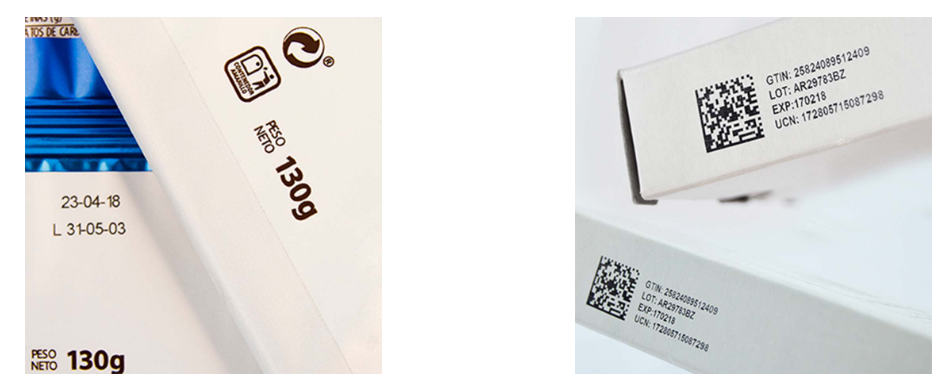
Laser coding usually costs more upfront, but it has lower consumable costs. The mark is often permanent, clean, and sharp, but the system must be matched carefully to the material. It may also require safety guarding and fume extraction.
In other words, inkjet is often better when flexibility matters most. Laser is often better when permanence, low consumables, and high-volume operation matter most.
Cost Comparison: Initial Investment vs Long-Term Cost
Cost is usually one of the first things buyers compare.
In most cases, an inkjet coding machine has a lower initial purchase price than a laser coding machine. This makes inkjet attractive for small and medium-sized businesses, new production lines, or factories that need several printers across different packaging stations.
Laser coding machines usually require a higher upfront investment. The equipment itself is more expensive, and depending on the application, you may also need safety enclosures, extraction systems, installation support, and technical integration.
However, the long-term cost picture can change.
Inkjet machines require consumables. Depending on the printer type, this may include ink, solvent, make-up fluid, cartridges, cleaning solution, filters, or replacement parts. These costs may be reasonable for low-volume production, but they can become significant on high-speed lines running every day.
Laser machines do not use ink. That means no ink purchasing, no cartridge replacement, and no drying problems. For high-volume production, this can make laser coding more economical over time.
A simple way to think about it:
| Cost Factor | Inkjet Coding Machine | Laser Coding Machine |
|---|---|---|
| Initial equipment cost | Lower | Higher |
| Consumables | Ink, solvent, cartridges, cleaning fluids | Usually none |
| Long-term running cost | Higher over time | Lower over time |
| Best for | Flexible and lower-budget applications | High-volume, long-term operation |
If your production volume is low or your packaging changes often, inkjet may be easier to justify. If your line runs continuously and uses stable packaging materials, laser may provide better long-term value.
Print Quality and Mark Durability
Print quality is another major point in the inkjet vs laser coding machine decision.
Laser coding usually creates a very sharp and permanent mark. Since the mark is formed by altering the surface, it is resistant to smudging, rubbing, moisture, and many environmental factors. This is especially useful for traceability codes, serial numbers, industrial parts, and products that may face handling, shipping, or outdoor exposure.
Inkjet printing can also produce clear and high-quality codes, especially with modern high-resolution printers. It can print text, numbers, logos, barcodes, QR codes, and sometimes more complex graphics. The final result, however, depends heavily on the ink, the surface, the drying time, and the production environment.
On porous surfaces like cartons and paper labels, inkjet can perform extremely well. On non-porous surfaces like plastic bottles, metal cans, glossy films, or glass, the correct ink formula becomes very important. Without the right ink, the code may smear, fade, or fail adhesion tests.
Laser marks are usually more durable. Inkjet marks are usually more flexible in appearance and application.
Material Compatibility
Material compatibility is where inkjet often has an advantage.
Inkjet coding can be used on a wide range of surfaces, including:
- Paper
- Cardboard
- Corrugated cartons
- Plastic films
- Plastic bottles
- Glass
- Metal
- Flexible packaging
- Labels
- Wood
- Coated cartons
- Pouches
The key is choosing the right ink. For example, porous cardboard may use a different ink from plastic film. Food packaging may require suitable inks for packaging safety and compliance. Non-porous surfaces may require fast-drying solvent-based inks or UV-curable inks.
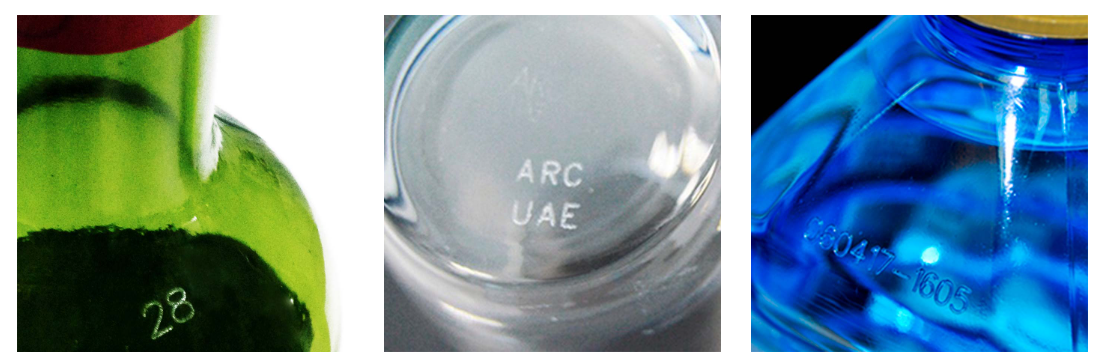
Laser coding is more material-specific. A laser machine must match the substrate. CO2, fiber, and UV lasers do not perform the same way on every material. A laser that works beautifully on cardboard may not be suitable for stainless steel. A system that marks metal parts well may not be ideal for thin plastic film.
This does not mean laser is limited in a bad way. It simply means the application must be tested carefully before purchase.
If your factory runs many different materials, inkjet may be safer. If your line uses one stable material and the laser result is excellent, laser can be a very strong choice.
Speed and Production Line Performance
Both inkjet and laser coding machines can operate at high speed.
Industrial inkjet printers are widely used on fast packaging lines because they can print while products move on conveyors. CIJ printers, in particular, are popular for high-speed coding on bottles, cans, cables, and small packages.
Laser coding machines are also very fast. In many applications, they can mark products at extremely high speeds with excellent precision. They are often suitable for continuous 24/7 production environments.
However, line speed is not only about the machine’s rated speed. It also depends on:
- Code size
- Amount of information printed
- Product movement
- Conveyor stability
- Marking area
- Material response
- Drying time for inkjet
- Laser power and marking method
For a simple date code, both technologies can be very fast. For complex graphics, dense QR codes, or large print areas, the comparison becomes more application-specific.
The best approach is to test your real product, real packaging, and real production speed before making a final decision.
Maintenance Requirements
Maintenance is one of the biggest differences between inkjet and laser systems.
Inkjet machines need more routine care. Depending on the technology, this may include printhead cleaning, nozzle checks, ink replacement, solvent management, filter replacement, and occasional purging. Modern inkjet systems are much easier to maintain than older machines, but they still rely on fluid systems and printheads.
Laser machines generally require less daily maintenance. Since there is no ink system, there are fewer consumable-related problems. There is no ink drying in the nozzle, no cartridge change, and no solvent handling.
That said, laser systems are not completely maintenance-free. Lenses, filters, cooling systems, extraction units, and safety components still need attention. A dirty lens or poor fume extraction system can affect marking quality and machine life.
In simple terms:
Inkjet requires more frequent but usually straightforward maintenance.
Laser requires less routine maintenance but may need more technical support when problems occur.
Safety and Environmental Considerations
Laser coding has a clean image because it does not use ink or solvents. This can reduce chemical waste and eliminate the need to store printing fluids. For companies focusing on sustainability, that can be a real advantage.
But laser coding also brings its own safety requirements. Because it uses a powerful beam of light, proper guarding, interlocks, warning systems, operator training, and eye safety measures are important. Laser marking can also create fumes, smoke, odors, or particles when it burns or removes material. In many applications, a fume extraction system is strongly recommended.
Inkjet coding uses inks and sometimes solvents. This means companies need to manage chemical storage, ventilation, waste handling, and operator safety. Some inks may have odor or VOC concerns, depending on the formulation.
Neither option is automatically “perfect” for the environment. Laser reduces consumables but may require extraction and electricity. Inkjet offers flexibility but depends on inks and fluids. The best choice depends on the full production environment.
Integration with Packaging Lines
For many factories, the coding machine is only one part of a larger packaging line. It must work with conveyors, sensors, PLCs, vision inspection systems, reject systems, labeling machines, filling machines, cartoners, case packers, or palletizing systems.
Inkjet printers are often easy to integrate. Many models are compact, adjustable, and suitable for different conveyor setups. They are commonly used for date coding, batch coding, and carton marking.
Laser systems may require more careful installation. The marking distance, focal length, safety enclosure, extraction system, and product positioning all matter. Once properly integrated, however, laser systems can be very stable and reliable.
If you need a quick, flexible installation, inkjet may be easier. If you are designing a high-speed automated line with a fixed product format, laser integration may be worth the extra planning.
When Should You Choose an Inkjet Coding Machine?
An inkjet coding machine is usually a good choice when you need flexibility, lower initial cost, and compatibility with many packaging materials.
It may be the better option if:
- You print on many different materials
- Your products or packaging change often
- You need lower upfront investment
- You print on cartons, labels, pouches, bottles, or films
- You need variable data, barcodes, QR codes, or logos
- You want easier integration into an existing line
- You are a small or medium-sized manufacturer
- You can manage ink and maintenance properly
Inkjet is especially practical for food packaging, beverage production, cosmetics, pharmaceuticals, e-commerce packaging, and general industrial packaging where product formats change regularly.
When Should You Choose a Laser Coding Machine?
A laser coding machine is often the better choice when you need permanent marks, low consumable cost, and high-volume production.
It may be the better option if:
- You need a permanent, tamper-resistant code
- Your production line runs continuously
- Your packaging material is stable
- You want to reduce ink and solvent usage
- You need sharp, clean, high-contrast marks
- You print on laser-compatible materials
- You can invest more upfront for lower long-term costs
- You have the right safety and extraction setup
Laser coding is especially useful for high-volume packaging, industrial parts, electronics, metal components, plastic parts, beverage containers, and traceability-focused applications.
Inkjet vs Laser Coding Machine: Quick Comparison Table
| Feature | Inkjet Coding Machine | Laser Coding Machine |
|---|---|---|
| Marking method | Sprays ink onto surface | Alters the material surface |
| Initial cost | Usually lower | Usually higher |
| Running cost | Ink and consumables required | Low consumable cost |
| Mark durability | Good, depends on ink and surface | Excellent, usually permanent |
| Material flexibility | Very broad | Depends on laser type and material |
| Maintenance | Regular cleaning and fluid care | Lower routine maintenance |
| Print colors | Possible depending on ink | Usually no color printing |
| Safety needs | Ink and solvent handling | Laser safety and fume extraction |
| Best use case | Flexible packaging and varied products | High-volume permanent coding |
Final Verdict: Which One Is Better?
There is no universal winner in the inkjet vs laser coding machine debate.
Inkjet is usually the better choice if you need flexibility, lower upfront cost, and the ability to print on many different packaging materials. It is practical, adaptable, and widely used across packaging lines of all sizes.
Laser is usually the better choice if you need permanent marks, lower consumable costs, and long-term performance on a stable production line. It requires more careful application testing and a higher initial investment, but it can be extremely efficient in the right environment.
Before buying either system, test your actual product samples. Check code readability, adhesion, contrast, speed, maintenance needs, safety requirements, and total cost over time.
The best coding machine is not simply the most advanced one. It is the one that fits your material, your line, your budget, and your production reality.
FAQ
1. What is the main difference between inkjet and laser coding machines?
The main difference is how they create the mark. Inkjet coding machines spray ink onto the surface, while laser coding machines use a focused beam of light to change, engrave, or remove part of the material surface.
2. Is laser coding better than inkjet coding?
Laser coding is better for permanent marks, low consumable costs, and high-volume production. Inkjet coding is better for flexible applications, lower initial cost, and printing on many different materials. The better choice depends on your product and packaging.
3. Which machine has lower running costs?
Laser coding machines usually have lower running costs because they do not require ink, solvent, or cartridges. Inkjet machines cost less upfront but need consumables over time.
4. Can inkjet coding machines print on plastic and metal?
Yes, inkjet coding machines can print on plastic, metal, glass, films, and other non-porous surfaces, but they require the correct ink type. Fast-drying solvent-based or UV-curable inks are often used for non-porous materials.
5. Are laser coding machines maintenance-free?
No machine is completely maintenance-free. Laser coding machines usually require less daily maintenance than inkjet printers, but lenses, extraction systems, filters, and safety components still need regular checks.
6. Which is better for food packaging?
Both inkjet and laser coding machines are used in food packaging. Inkjet is often chosen for flexible packaging and varied materials, while laser is useful for permanent, clean codes on compatible packaging. The choice depends on the packaging surface and production speed.
7. Can laser coding machines print color?
Laser coding machines generally do not print in color like inkjet systems. They create contrast by changing the surface of the material. If color printing is required, inkjet is usually the better choice.
8. Which coding machine is better for small businesses?
For many small businesses, inkjet coding machines are easier to start with because the initial cost is lower and the machines are flexible. However, if the business has stable packaging and high production volume, laser coding may become more cost-effective over time.