

Labeling machine label misalignment is one of those small production problems that can quickly become a big headache. One crooked label may not look serious at first, but when it happens across dozens, hundreds, or thousands of products, it affects product appearance, packaging quality, material waste, and line efficiency.
For jars, bottles, vials, cans, and other containers, label placement matters. A label that sits too high, too low, slanted, wrinkled, or off-center can make an otherwise good product look poorly packaged. In industries such as food, cosmetics, pharmaceuticals, and consumer goods, label accuracy is not just about appearance. It can also affect barcode readability, product information visibility, and compliance.
The good news is that most label misalignment problems are not mysterious. In many cases, the cause is something practical: web tension, sensor calibration, product spacing, worn rollers, or incorrect machine setup. Once you know where to look, troubleshooting becomes much easier.
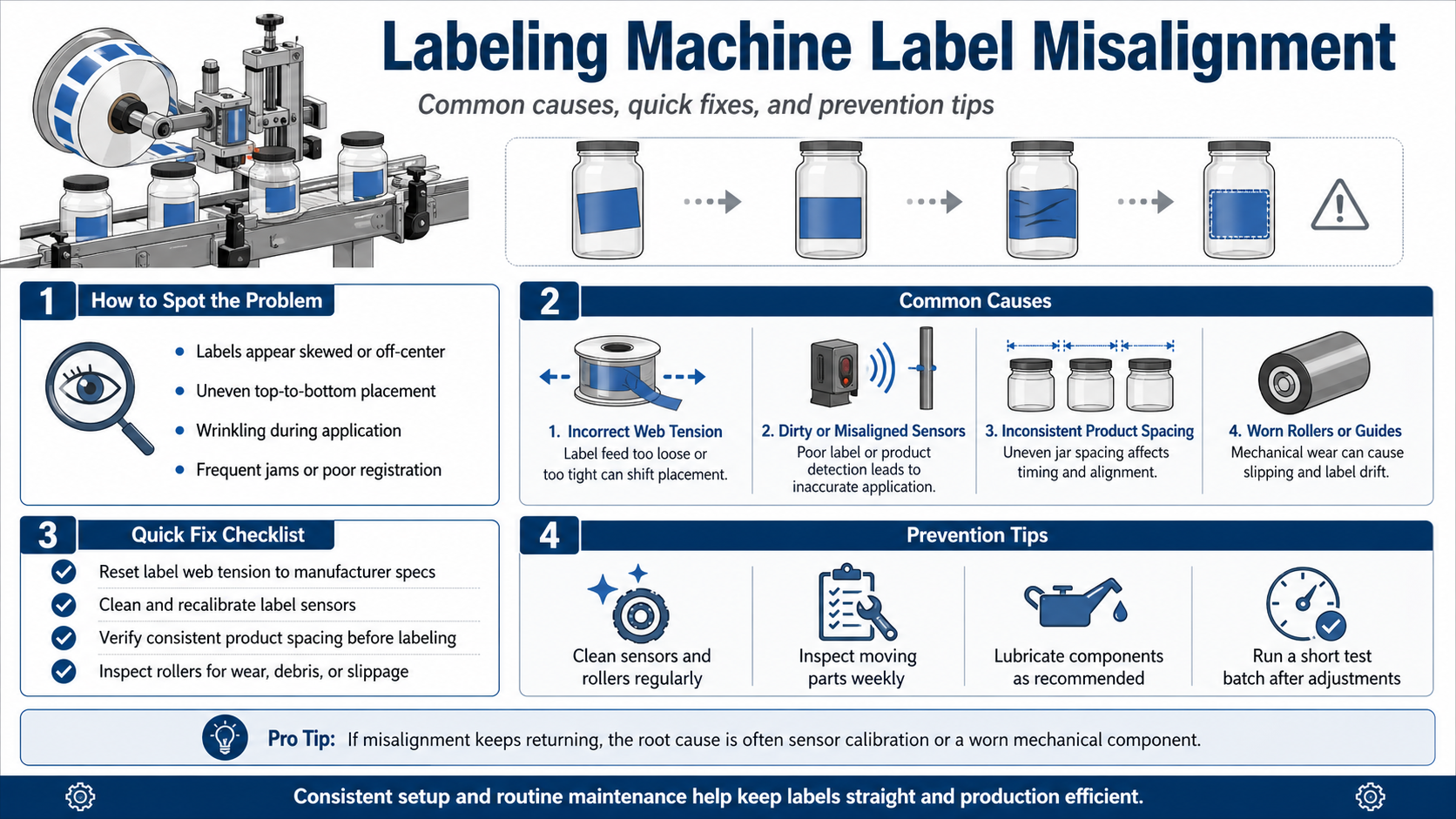
This guide walks through the common causes of labeling machine label misalignment, how to identify the problem, what to check first, and how to prevent the same issue from coming back.
What Does Labeling Machine Label Misalignment Look Like?
Before adjusting the machine, it helps to clearly identify the type of misalignment you are seeing. Not all label placement problems come from the same source.
Common signs include:
- Labels appear slanted or tilted on the product
- Labels are too high or too low
- Labels are not centered on the jar, bottle, or container
- Front and back labels do not line up properly
- Labels wrinkle during application
- Labels drift gradually during production
- Labels apply correctly at first, then become inaccurate after several cycles
- The label roll jams or feeds unevenly
- Barcodes or product information end up in the wrong position
A small shift may seem harmless, but it often points to a deeper issue in the label path, sensor setup, product handling, or mechanical components.
Common Causes of Labeling Machine Label Misalignment
Label misalignment usually comes from one of five areas: tension, sensors, label roll setup, product handling, or mechanical wear. Let’s break them down.
1. Incorrect Label Web Tension
Label web tension is one of the most common causes of misaligned labels. If the label web is too loose, the label may wander as it moves through the machine. If it is too tight, the label can stretch, pull unevenly, or create application problems.
You may notice:
- Labels slowly drifting out of position
- Labels feeding inconsistently
- Wrinkles or tension marks
- Labels applying correctly at low speed but shifting at higher speed
The fix is to reset the label web tension according to the machine manufacturer’s specifications. Avoid guessing. Small tension changes can have a large effect on label placement.
2. Dirty or Misaligned Label Sensors
Sensors tell the labeling machine when and where to apply each label. If the sensor is dirty, blocked, poorly positioned, or not calibrated correctly, the machine may fail to detect label gaps, eye marks, or product position accurately.
This can lead to labels being applied too early, too late, or inconsistently.
Check for:
- Dust on the sensor surface
- Adhesive residue near the sensor
- Loose sensor brackets
- Incorrect sensor distance
- Poor detection of transparent, dark, glossy, or irregular labels
Clean sensors with a lint-free cloth and recalibrate them based on the label material and machine manual. If label misalignment keeps recurring, sensor calibration should be one of the first things you inspect.
3. Incorrect Product Spacing
Even if the label roll and sensors are working correctly, poor product spacing can still cause label placement problems. If containers enter the labeling area too close together, too far apart, or at uneven intervals, the machine may apply labels at the wrong moment.
This is especially common when products are fed manually or when upstream conveyors, timing screws, starwheels, or separators are not adjusted correctly.
Look for:
- Inconsistent gaps between products
- Containers touching each other before labeling
- Products wobbling or rotating during application
- Different container sizes mixed in the same run
For accurate labeling, the product must enter the labeling head in a stable and repeatable position.
4. Worn or Dirty Rollers
Rollers guide the label web through the machine. Over time, they can wear down, collect adhesive, lose grip, or become slightly misaligned. Even a small mechanical issue can affect label tracking.
Inspect guide rollers, drive rollers, and pressure rollers for:
- Wear marks
- Adhesive buildup
- Uneven rotation
- Slippage
- Cracks or hardening
- Loose mounting points
If a roller slips or pulls unevenly, the label web may shift before it reaches the application point.
5. Incorrect Label Roll Loading
A label roll that is not loaded correctly can cause immediate alignment problems. The label web needs to follow the correct path through the unwind, guides, sensor, peel plate, and application head.
Common loading mistakes include:
- Label roll not centered
- Web path threaded incorrectly
- Roll installed in the wrong direction
- Edge guides set too wide or too tight
- Label backing not tracking smoothly
Before making deeper adjustments, always confirm that the roll is installed correctly. Many alignment issues come from simple setup errors.
How to Troubleshoot Labeling Machine Label Misalignment
When labels start applying incorrectly, do not adjust everything at once. A better approach is to check the machine step by step. This helps you find the real cause instead of creating new problems.
Step 1: Stop and Inspect the Label Path
Start from the unwind section and follow the label web all the way to the application point.
Check whether:
- The roll is centered
- The web is threaded correctly
- The backing paper moves smoothly
- The label web is rubbing against guides
- Labels are peeling cleanly
- The peel plate is clean and properly positioned
If the label path is not stable, the final label placement will not be stable either.
Step 2: Check Label Web Tension
Next, inspect the web tension. The label material should move smoothly without sagging, pulling, or stretching.
If the web looks loose, increase tension gradually. If labels wrinkle, tear, or pull too aggressively, reduce tension. Always make small adjustments and test after each change.
A useful rule: tension should be firm enough to keep the label web tracking straight, but not so tight that it distorts the label or backing paper.
Step 3: Clean and Calibrate the Sensors
Label sensors and product sensors are critical for accurate application. Clean them carefully with a soft, dry, lint-free cloth.
Then check:
- Is the label sensor positioned over the correct gap or mark?
- Is the sensor suitable for the label type?
- Is the product sensor detecting each container consistently?
- Are transparent labels, glossy labels, or dark labels causing detection issues?
After cleaning, run a few test cycles at low speed and watch whether the sensor detects every label consistently.
Step 4: Verify Product Spacing and Stability
Watch the containers as they enter the labeling area. The product should move smoothly and consistently.
Check whether:
- Products are evenly spaced
- Containers are upright and stable
- The conveyor speed matches the labeling speed
- Guides hold the product without squeezing it
- Round containers rotate smoothly during wraparound labeling
For jars and bottles, even a small wobble can cause the label to land crooked.
Step 5: Inspect Rollers, Belts, and Guides
Mechanical wear is a common reason why label misalignment keeps coming back after temporary adjustments.
Inspect:
- Guide rollers
- Drive belts
- Pressure pads
- Wrap belts
- Side guides
- Timing screws
- Starwheels
- Labeling head brackets
If labels are consistently off by the same amount, the labeling head or guide system may need adjustment. If the problem changes randomly, look for slipping, wear, or inconsistent product movement.
Step 6: Run a Short Test Batch
After making adjustments, do not immediately restart full production. Run a short test batch first.
Check:
- First label placement
- Label position after 10–20 products
- Consistency at normal production speed
- Barcode and text position
- Label edge alignment
- Wrinkles or bubbles
If the first few products look good but the label slowly drifts, the issue may still be tension, tracking, or mechanical slippage.
Quick Fix Checklist for Misaligned Labels
Use this checklist when you need a fast diagnosis:
- Check that the label roll is loaded correctly.
- Reset label web tension to the recommended range.
- Clean label and product sensors.
- Recalibrate the label sensor for gap or eye-mark detection.
- Confirm product spacing before the labeling head.
- Inspect guide rollers for wear, dirt, or adhesive buildup.
- Check whether the labeling head is aligned with the product surface.
- Run a short test batch before full production.
- Compare label placement at low speed and normal speed.
- If the issue repeats, inspect worn mechanical parts or call a technician.
Preventing Label Misalignment Before It Stops Production
The best way to deal with label misalignment is to prevent it from happening regularly. A simple maintenance routine can save a lot of wasted labels, rejected products, and production delays.
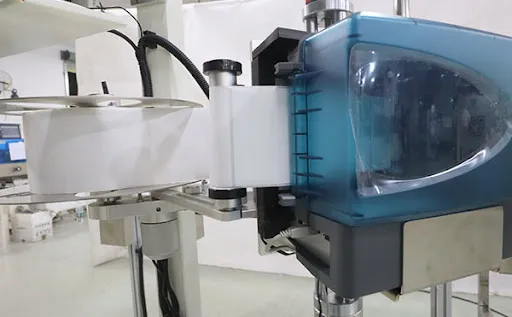
Clean the Machine Daily
Dust, paper fibers, and adhesive residue can build up around sensors, rollers, guides, and the peel plate. This buildup may look minor, but it can affect label feeding and detection.
At the end of each shift or production day:
- Wipe sensors with a lint-free cloth
- Remove adhesive residue from rollers
- Check the peel plate for buildup
- Clean product guides
- Remove scraps of label backing or damaged labels
Inspect Mechanical Parts Weekly
Set a weekly inspection routine for moving components.
Focus on:
- Rollers
- Belts
- Bearings
- Gears
- Guides
- Labeling head mounts
- Conveyor alignment
If a part is loose or worn, fix it early. Waiting until the machine fails usually costs more.
Lubricate Moving Parts Properly
Machines with moving parts need proper lubrication. Too much friction can cause jerky movement, inconsistent product handling, and mechanical wear.
Follow the machine manual for lubrication intervals and lubricant type. Do not over-lubricate near label paths, because oil contamination can create new problems.
Keep Setup Records
If your production line handles different container sizes or label types, keep a simple setup record for each product.
Include:
- Label roll type
- Sensor settings
- Web tension settings
- Conveyor speed
- Labeling head position
- Product guide position
- Common adjustment notes
This makes changeovers faster and reduces operator guesswork.
When Should You Call a Technician?
Many labeling machine label misalignment issues can be fixed by operators, especially when the cause is web tension, sensor cleaning, or product spacing. But some problems need professional support.
Call a technician if:
- Misalignment keeps returning after adjustment
- Labels drift even after sensor calibration
- Rollers or belts show visible wear
- The machine makes unusual mechanical noises
- Product handling components are damaged
- The labeling head cannot stay aligned
- Electrical or sensor faults appear repeatedly
- The machine performs well at low speed but fails at production speed
A professional technician can check deeper mechanical alignment, electrical signals, sensor performance, and worn components.
Final Thoughts
Labeling machine label misalignment is frustrating, but it is usually fixable with a methodical approach. Start with the basics: label roll loading, web tension, sensors, product spacing, and rollers. These areas cause most alignment problems.
For production teams, the real goal is not just fixing one crooked label. It is building a stable process so every product leaves the line looking clean, consistent, and shelf-ready.
A few minutes of inspection can often prevent hours of downtime. Keep the machine clean, record your settings, replace worn parts early, and run short test batches after every adjustment. That small routine can make a big difference in packaging quality.
FAQ
What causes labeling machine label misalignment?
The most common causes are incorrect label web tension, dirty or misaligned sensors, uneven product spacing, worn rollers, incorrect label roll loading, or poor labeling head adjustment.
How do I fix misaligned labels on a labeling machine?
Start by checking the label roll path, resetting web tension, cleaning and calibrating sensors, confirming product spacing, and inspecting rollers or guides for wear. Then run a short test batch before restarting full production.
Why do labels start straight but slowly drift during production?
Gradual label drift often comes from unstable web tension, poor tracking, roller slippage, or mechanical wear. It can also happen when the label roll is not centered or the edge guides are not set correctly.
Can dirty sensors cause label misalignment?
Yes. Dust, adhesive residue, or poor sensor positioning can prevent the machine from detecting label gaps, eye marks, or products accurately. This can cause labels to apply too early, too late, or in inconsistent positions.
How often should a labeling machine be maintained?
Basic cleaning should be done daily or after each production shift. Rollers, belts, guides, and moving parts should be inspected weekly. Lubrication and deeper maintenance should follow the manufacturer’s recommended schedule.
When should I call a professional for label misalignment?
Call a technician if misalignment keeps returning after normal adjustments, if the machine makes unusual noises, if rollers or belts are worn, or if the labeling head cannot stay properly aligned.